

The scenes in between are your signed-off story in both modes.
Take a script that opens “Hey, I know you’re looking for a new supplier. I’m your advisor.”
- Adaptive: “Hey Laura, good to hear you’re looking for a new supplier. I’m Tom, your advisor.”
- Strict: “Hey Laura, I know you’re looking for a new supplier. I’m your advisor, Tom Peeters.”
Do
1
Pick the mode
In step Package, set the switch above the dimensions to Strict. The hint next to it
explains both modes.
2
Switch on the names
Under Intro scene and Outro scene, switch on what should be said: Personal name
spoken, Company name spoken, Presenter name. For the presenter, choose First name
or First and last.
3
Say where each name goes
Go back to step Base & Data. In the chat under Narrative guidelines, say where each name
belongs: “the recipient’s name goes right after Hey”. The chat reads your opening and closing
and writes one per name.
4
Sign off
In step Review, press Sign off. If a name has no place yet, the sign-off tells you which
one, and Open the style chat takes you back to the chat.
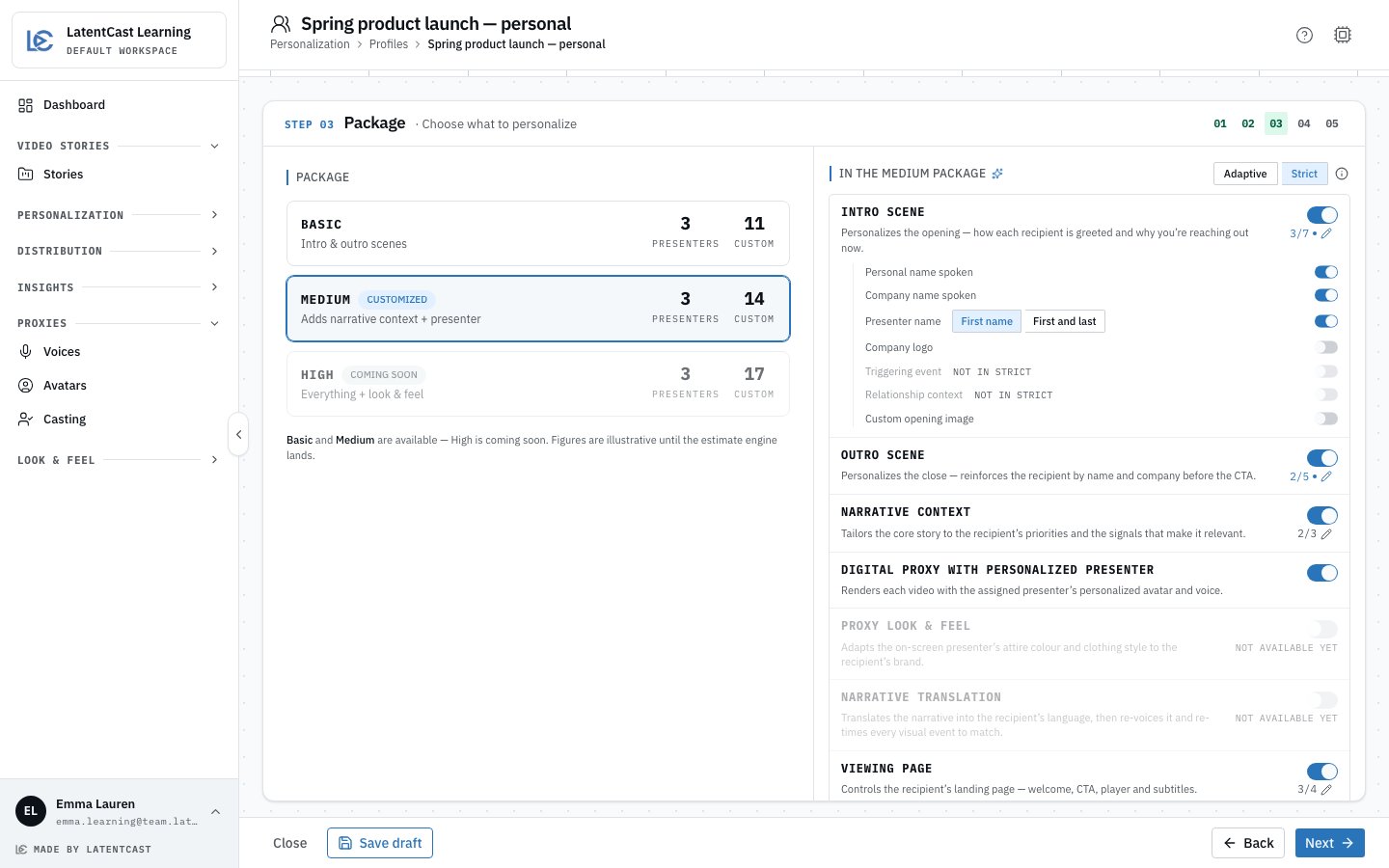
The Package step in Strict: the mode switch at the top, Presenter name with its two forms.
Placement lines
A placement line names the scene, the name, and the words of your script it belongs to:- intro recipient name: directly after “Hey”
- intro presenter name: directly after “I’m your advisor”
- intro company name: replaces “your company”
- The quoted words are in your script, exactly as written. The sign-off checks this.
- One spot per name. Two names at the same spot would need a joining word, and Strict adds none.
- A name replaces four words at most. For a longer stretch, shorten that spot in the story.
What Strict leaves out
- Triggering event and Relationship context read Not in Strict: they are free text, and free text has no fixed place in a script. A context scene can still be switched on, and it is written for each recipient as before.
- Tone and phrasing from your narrative guidelines do not touch the opening and the closing. They still shape the context scene.
- A recipient without a spoken name gets no name. The script stays as written for them; the full name from your list is never read out in its place.
In Strict a video never goes out with changed wording. When the script cannot be kept for a
recipient, that video fails and shows up in the batch’s failures. The production report of a video
that did succeed says how many names were put in.
Duplicating a Strict profile
Placement lines quote one story. When you Duplicate a Strict profile onto another story from the campaign guide, the copy arrives as a draft without them: place the names in the chat again, then sign it off. On the same story the copy is signed off at once.Next
Building a profile
The wizard these steps belong to.
Proving it on one recipient
Produce one real person’s video and read the opening.