

What a Personalization Canvas can personalize
The columns fall into a handful of dimensions. Each one is a different way the video adapts to the recipient:- Name and company. Who the recipient is and where they work, so the video addresses them directly.
- Narrative, the deep personalization. Four kinds of sales intelligence that shape what is said: a triggering event (why now), the relationship context (how you know them), their strategic priorities (what they are working towards) and relevance signals (why your offer fits them).
- Logo and images. Visuals that refer to the recipient, such as their company logo or pictures of their business, shown on screen.
- Language. The language the recipient hears the video in.
- Viewing Page messages. The text on the personal page where the recipient watches their video.
- The presenter. The colleague who appears on screen for this recipient, usually the sales rep who owns them.
Do
1
Prepare your recipient list
Take the Personalization Canvas template. One row per recipient. Fill in who they are (name,
email, role, company, industry, country), who presents (their name and email), and your sales
intelligence for the narrative: triggering event, relationship context, strategic priorities,
relevance signals. Add their language, logo and images, and Viewing Page messages if you have
them. Leave a cell empty when you do not know. Never guess.
2
Upload it
In the guide, press Choose or create. A signed-off canvas you already have? Pick it, press
Use canvas, and go on to the last step. Otherwise press New canvas and drop the file in.
It becomes a Personalization Canvas. LatentCast reads it and shows a report: how many recipients it found, which sheets it
read, and any warnings. The chat panel on the right answers questions about the data: what is
missing, what looks thin, what looks odd.
3
Check it
The list opens as a grid. Read it the way the video will: every cell about a recipient becomes
a sentence spoken to that recipient. Validate what was imported and fix what is wrong or out of
date. Your own Excel file is not touched.
4
Sign it off
Press Sign-off in the last step of the canvas wizard. That freezes the Personalization
Canvas, and only a signed-off canvas can be used in the next stage. Back to campaign returns
you to the guide.
5
Decide on pronunciation
Station 02 then asks how the voices should say the names in your list. Press
Create dictionary to build a pronunciation dictionary from the names in the canvas, check
it, and press Pronunciation reviewed. If the names are plain to pronounce, press
Skip pronunciation and give a reason. Either choice is recorded, and a skip can be undone.
See Pronunciation dictionaries.
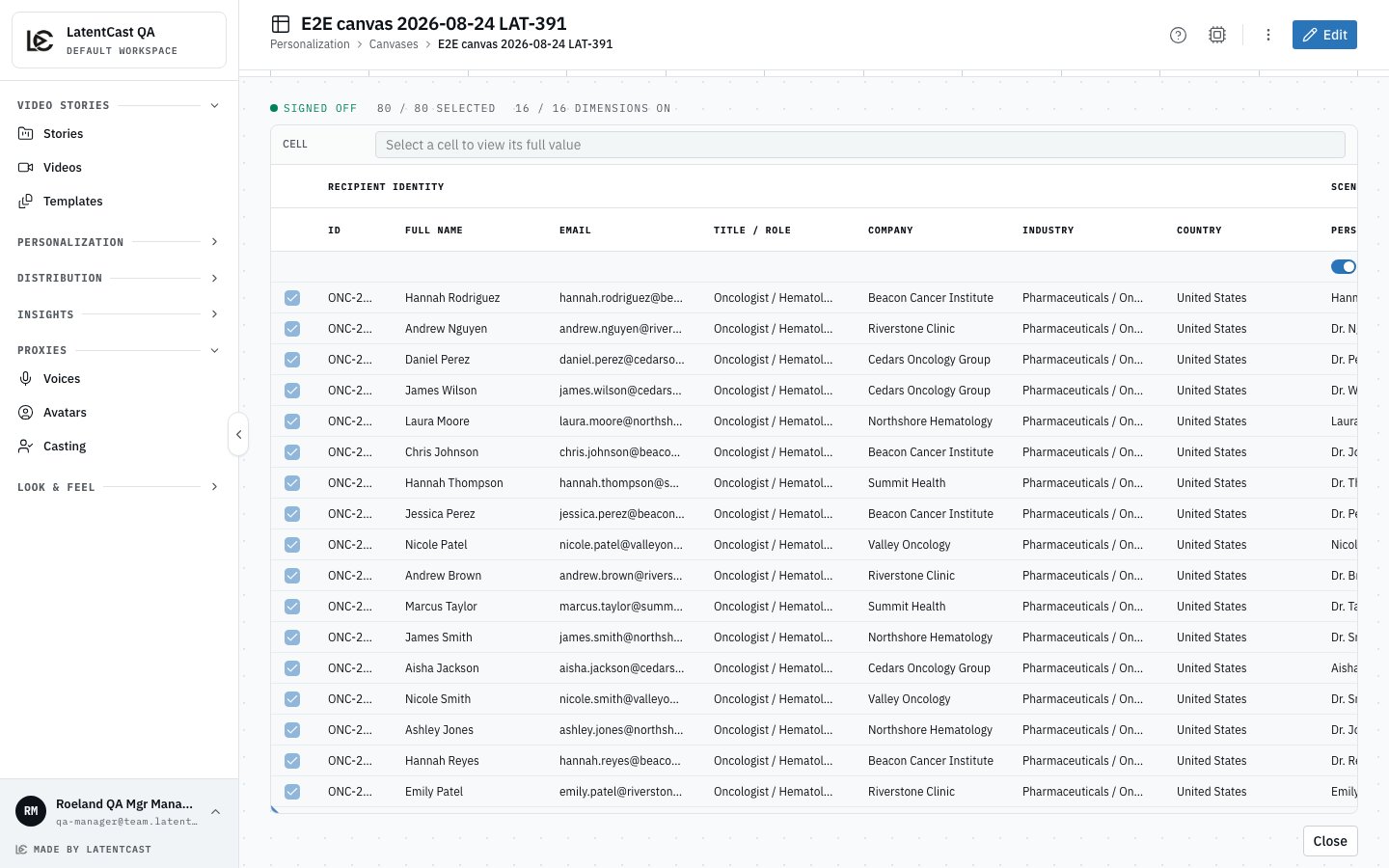
A signed-off Personalization Canvas: the recipients on the left, the columns grouped by what they feed, and the counts along the top.
Watch out
An empty cell is skipped, never filled in. If a recipient has no triggering event, their video
simply does not mention one. Every column is imported; which ones are used, and how, is decided in
the next stage by the .
The colleagues named as presenters become the cast. Use the email address each of them logs in to
LatentCast with. They will be asked to consent before their face and voice are used.