

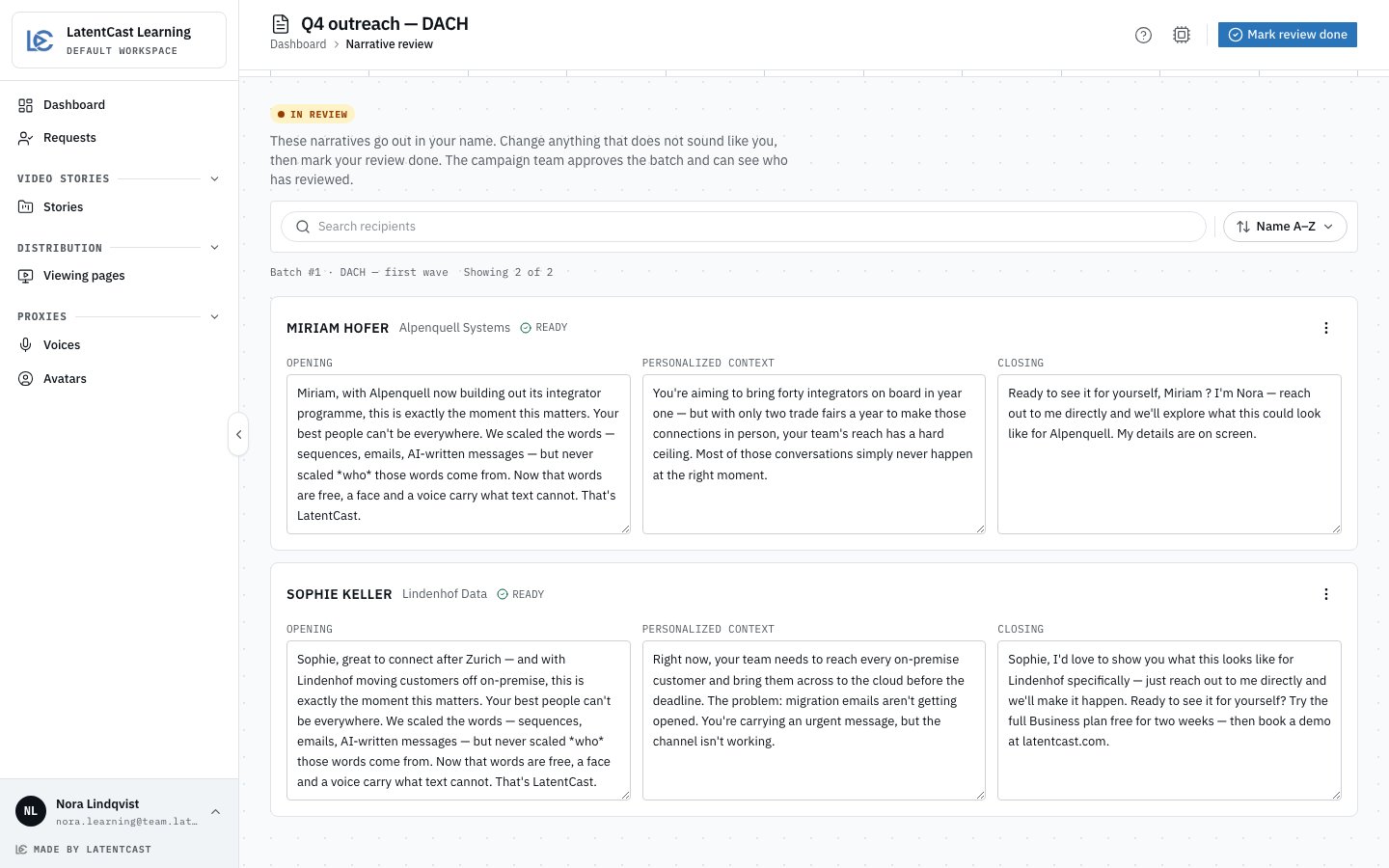
Your review: your recipients only, with the personal parts of each script in boxes you can edit.
Do
1
Open your review
Press Review on the task, or Review all narratives on one of your stories.
2
Read every recipient
One card per recipient: the opening, the personalized context and the closing. View target
info, in the card’s menu, shows the data the text was written from.
3
Change what does not sound like you
Type into a box and it saves as you go. Undo edit puts back the original wording.
4
Mark your review done
Press Mark review done once you have read them all, and you are back on your Dashboard.
Undo on the message, or Reopen review on the page, takes it back while the batch still
waits.
What the campaign team sees
Their review page lists the batch’s presenters: who has marked their review done, and when. Your edits are in the same boxes they read, so they see your wording.Nothing waits for you. The campaign team can approve the batch with or without your mark. Review
as soon as the task appears: once they approve, the review is closed.
After the approval
Your task goes and the page turns read-only: a record of what was said to whom, with your mark on it. Voicing and the videos follow, and Generate video is back on your stories.Next
Your stories and viewing pages
Correct a story and make its video again.
Reviewing before you send
The campaign team’s side of the same review.