> ## Documentation Index
> Fetch the complete documentation index at: https://www.latentcast.com/docs/llms.txt
> Use this file to discover all available pages before exploring further.
# Creating a story
> The four-step wizard that turns your material and a short brief into a finished video story.
**Where:** Video Stories ▸ Stories, then **New Story**
You supply two things: material to work from, and a sentence about what the video should achieve.
The wizard asks for them in four steps, and then the system writes the
script, builds the scenes, and produces a story you can watch.
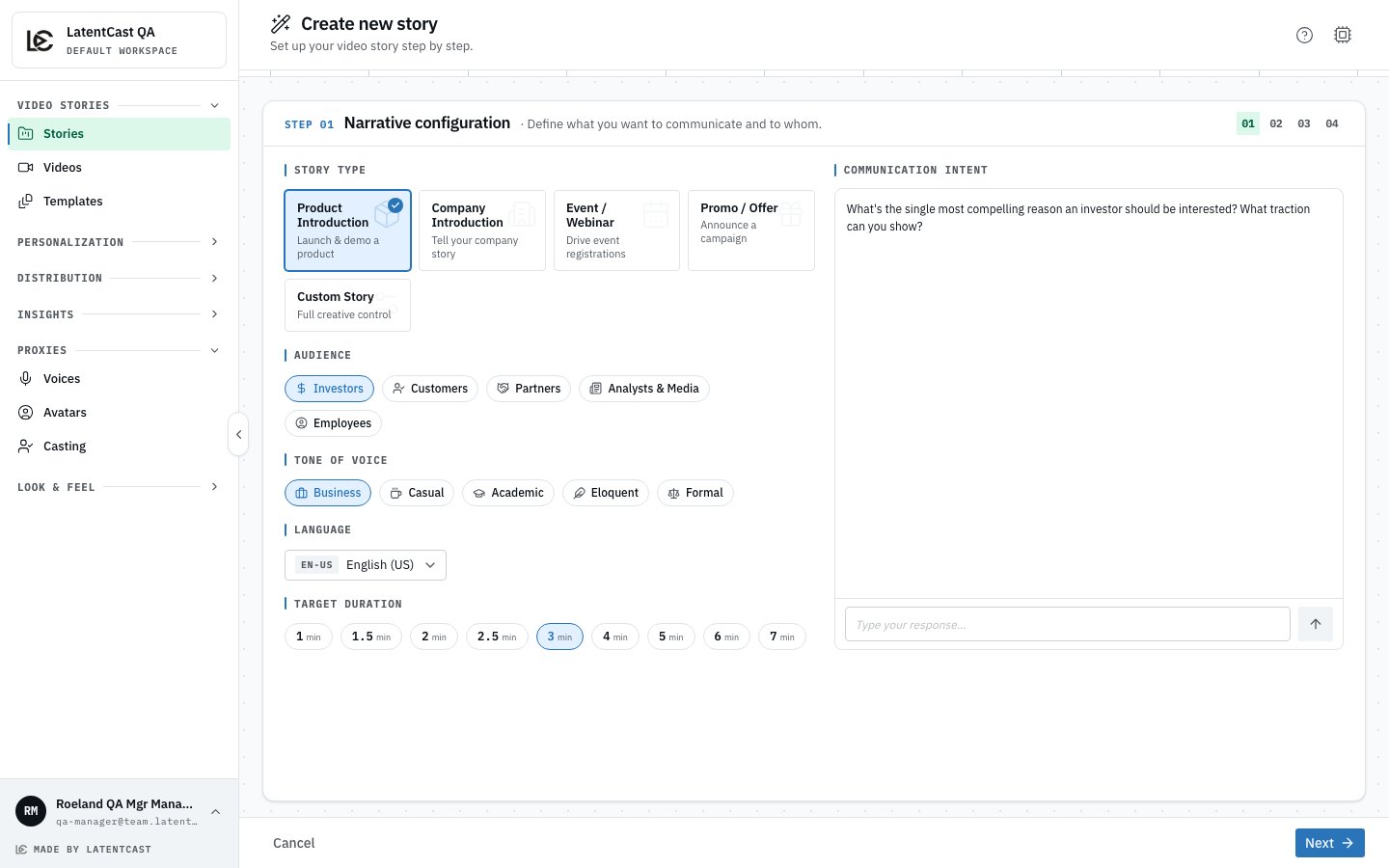
## Step 1 · Narrative configuration
What the video is, and who it is for.
| Choice | What it decides |
| -------------------------------------------------------------------------------------------------------------------------------------------------------------- | -------------------------------------------------------------------------------------------------------------------------------------- |
| **Story type** | Product introduction, company introduction, event or webinar, promotion or offer, or a custom story |
| **Audience** | Investors, customers, partners, analysts and media, or employees. The options follow the story type. |
| **Tone of voice** | Business, casual, academic, eloquent or formal |
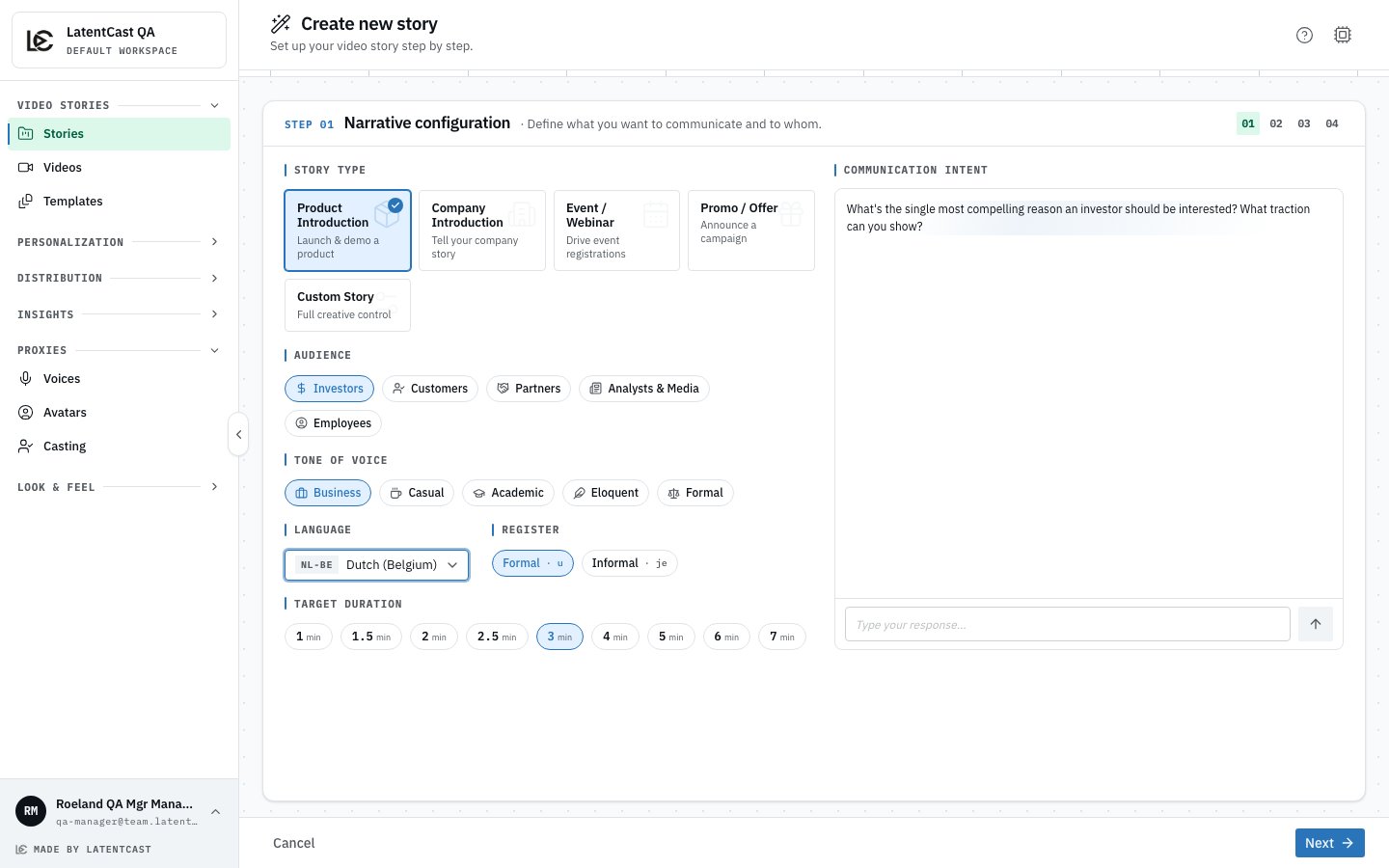
| **Language** | The language the story is written and spoken in: English (US or UK), Dutch (Belgium or the Netherlands), or French (France or Belgium) |
| **Register** | Dutch and French only: whether the video addresses the viewer formally (u, vous) or informally (je, tu) |
| **Target duration** | From one to seven minutes |
| **Communication intent** | A sentence or two on what you want this video to achieve |
The intent matters more than its size on the screen suggests. It steers what the system pulls out of
your material and what it leaves behind. "Introduce our new analytics module to existing customers
and get them to book a demo" produces a different video from "explain what the analytics module
does".
 ### The language is settled here
A story is written and spoken in one language, and **the choice is fixed once the script exists** —
after that the wizard shows it locked. So decide it now rather than later.
Everything downstream follows from it: the narration, the on-screen text, the
[tuning chat](/docs/guides/stories/tuning-chat), the personalized videos made from this story, and the
page each recipient watches on. Where you can, upload material in the same language; a Dutch story
written from Dutch source documents uses the words your own documents use.
One thing to check before you produce: the presenter needs a voice that covers the language. See
[Your voice](/docs/guides/presenters/your-voice).
### The language is settled here
A story is written and spoken in one language, and **the choice is fixed once the script exists** —
after that the wizard shows it locked. So decide it now rather than later.
Everything downstream follows from it: the narration, the on-screen text, the
[tuning chat](/docs/guides/stories/tuning-chat), the personalized videos made from this story, and the
page each recipient watches on. Where you can, upload material in the same language; a Dutch story
written from Dutch source documents uses the words your own documents use.
One thing to check before you produce: the presenter needs a voice that covers the language. See
[Your voice](/docs/guides/presenters/your-voice).
 ## Step 2 · Narrative content
Your material. Upload a product brochure, a slide deck, a report, or several. The system reads and
analyses each file as soon as it arrives.
Then it does something worth knowing about in advance: it **checks that your material can actually
support the video you asked for**. If you ask for a customer-facing product introduction and upload
an internal financial summary, it will tell you the two do not line up and stop, rather than writing
a confident video out of thin air.
**This is a feature, not an obstacle.** LatentCast only says things your material supports. If you
hit a refusal, the fix is usually one of two things: upload the document that actually covers what
you want to say, or change the intent to match what you uploaded.
You can also add **guidance**: free text with anything else the system should know. If your source
document suggests timings or slide layouts, you can ignore them. The system reads your material for
its content, not its formatting.
## Step 3 · Production style
How the video should look and feel. You pick a style and a
brand kit, and can add production notes for visual direction. Both are
covered on [Brand kits and styles](/docs/guides/stories/brand-kits-and-styles).
The presenter's voice is not chosen here. A story speaks with the voice set for its language, and
you can pin a specific one afterwards in the story's settings.
## Step 4 · Summary and review
A recap of your choices. Create the story, and production starts.
## While your story is built
Building takes a few minutes. The story page shows the work moving through its stages: reading your
material, writing the script, speaking it, choosing and generating the visuals, timing the on-screen
text, then assembling and checking the result.
The last stage is a self-check. The system compares what was produced against what was planned and
repairs what it can. You do not have to do anything while this runs, and you can leave the page.
**Video backgrounds arrive late, on purpose.** A scene that uses a moving background shows a
placeholder while the real clip renders, so the preview stays watchable. The clip swaps itself in
when it is ready. See [Backgrounds](/docs/guides/stories/backgrounds).
## Changing your mind later
You can reopen the wizard on an existing story. What happens next depends on what you change:
* change the **audience or the material**, and the story is rebuilt more thoroughly, script included;
* change **only the production style**, and just the visuals are rebuilt.
For smaller changes, do not reopen the wizard at all. Talk to the
[tuning chat](/docs/guides/stories/tuning-chat) instead.
## Next
What you are looking at when the preview plays.
Your colours, fonts and logo, and how a story is paced.
## Step 2 · Narrative content
Your material. Upload a product brochure, a slide deck, a report, or several. The system reads and
analyses each file as soon as it arrives.
Then it does something worth knowing about in advance: it **checks that your material can actually
support the video you asked for**. If you ask for a customer-facing product introduction and upload
an internal financial summary, it will tell you the two do not line up and stop, rather than writing
a confident video out of thin air.
**This is a feature, not an obstacle.** LatentCast only says things your material supports. If you
hit a refusal, the fix is usually one of two things: upload the document that actually covers what
you want to say, or change the intent to match what you uploaded.
You can also add **guidance**: free text with anything else the system should know. If your source
document suggests timings or slide layouts, you can ignore them. The system reads your material for
its content, not its formatting.
## Step 3 · Production style
How the video should look and feel. You pick a style and a
brand kit, and can add production notes for visual direction. Both are
covered on [Brand kits and styles](/docs/guides/stories/brand-kits-and-styles).
The presenter's voice is not chosen here. A story speaks with the voice set for its language, and
you can pin a specific one afterwards in the story's settings.
## Step 4 · Summary and review
A recap of your choices. Create the story, and production starts.
## While your story is built
Building takes a few minutes. The story page shows the work moving through its stages: reading your
material, writing the script, speaking it, choosing and generating the visuals, timing the on-screen
text, then assembling and checking the result.
The last stage is a self-check. The system compares what was produced against what was planned and
repairs what it can. You do not have to do anything while this runs, and you can leave the page.
**Video backgrounds arrive late, on purpose.** A scene that uses a moving background shows a
placeholder while the real clip renders, so the preview stays watchable. The clip swaps itself in
when it is ready. See [Backgrounds](/docs/guides/stories/backgrounds).
## Changing your mind later
You can reopen the wizard on an existing story. What happens next depends on what you change:
* change the **audience or the material**, and the story is rebuilt more thoroughly, script included;
* change **only the production style**, and just the visuals are rebuilt.
For smaller changes, do not reopen the wizard at all. Talk to the
[tuning chat](/docs/guides/stories/tuning-chat) instead.
## Next
What you are looking at when the preview plays.
Your colours, fonts and logo, and how a story is paced.